PayJoin + RGB20 Transaction Guide
Document Overview
This document defines a step-by-step implementation specification for completing RGB20 asset trades using PayJoin. It covers the message flows, PSBT construction and validation, signing, and broadcasting. The goal is to standardize interactions between buyer and seller and to ensure auditable on-chain and off-chain processes.
Preconditions (Must be satisfied)
- The Buyer (Bob) must hold at least one UTXO capable of receiving RGB20 assets (used for asset anchoring / receiving outputs).
- The Buyer (Bob) pays on-chain transaction fees and must have sufficient BTC balance to cover the payment and fees.
- The Seller (Alice) must control a spendable UTXO containing the RGB20 assets to be sold, and must have enough RGB20 units within that UTXO to cover the sale.
- Both parties must agree on trade parameters (price, quantity, etc.). These parameters can be provided by an order book or matching engine and must be fixed in the order summary.
Roles & Terminology
- Buyer (Bob): Pays BTC and covers on-chain fees; receives the RGB20 asset.
- Seller (Alice): Asset holder; provides the UTXO that carries the RGB20 asset; receives BTC in return.
- Market Backend (matching/relay service): Relays messages and PSBTs between parties but does not manage private keys or perform signing. It is recommended that the backend remain non-custodial (i.e., it should not hold any signing credentials).
High-Level Flow
Precondition: A match has been found (by the Market). Alice lists an asset for sale and Bob initiates purchase.
- Bob confirms the purchase and submits a purchase request to the Market (includes an unbroadcast PSBT template and an invoice).
- The Market notifies Alice and asks her to prepare the RGB consignment and incorporate it into the PSBT.
- Alice confirms the sale and submits a join-pay PSBT (containing her asset input and the consignment) to the Market (with a
payment_id). - The Market notifies Bob to review and confirm the merged PSBT / transaction parameters.
- Bob confirms and partially signs his inputs, then submits the partially signed PSBT to the backend (
joinpay btc sign psbt). - The Market notifies Alice for final confirmation and requests her to complete RGB-related signatures and finalize the PSBT.
- Alice signs her portion of the PSBT (including RGB consignment witness/signatures) and submits the finalized transaction for broadcast.
- After successful broadcast and on-chain confirmation, both wallets update balances and asset holdings.
Below we expand each step with operational details, message formats, validation points, and error handling.
Detailed Step-by-Step Implementation
Order Parameters (provided by Market)
- Inputs: Order data (contract ID, quantity, price, fee payer, etc.)
- Outputs: Final trade parameters (price, amount, fee, timeout, order_id, etc.)
Implementation note: Before initiating a trade, the client (or web UI) should let the buyer select the purchase amount and then create an order. The order summary must include a timestamp, a unique nonce / order ID, and the public keys or addresses of both parties. The order summary should support signatures from both sides to prevent tampering and replay attacks.
Step 1 — Bob confirms purchase and submits to Market
Objective: Buyer injects his payment inputs into an initial PSBT template and locks an output UTXO designated to receive the RGB asset (asset anchoring).
Preconditions: Buyer must have at least one UTXO suitable for receiving the RGB asset, and enough BTC to cover payment + fees.
Key actions:
- The Market UI prompts the wallet interaction flow.
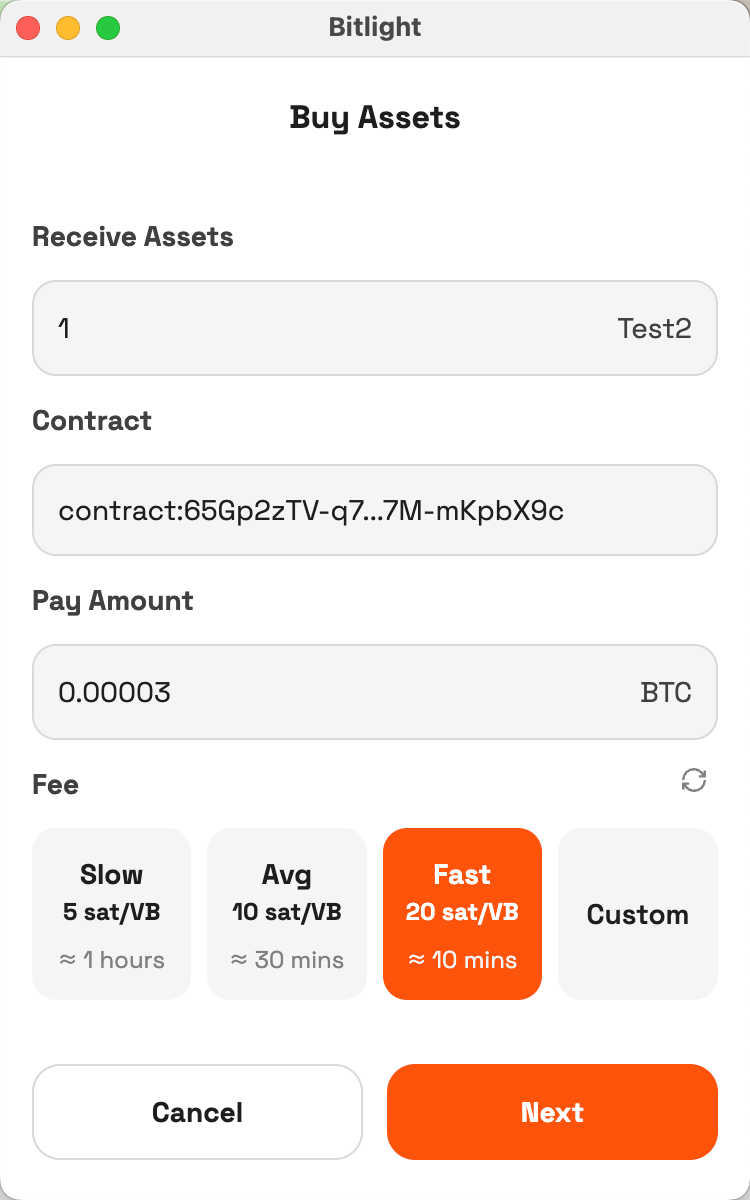
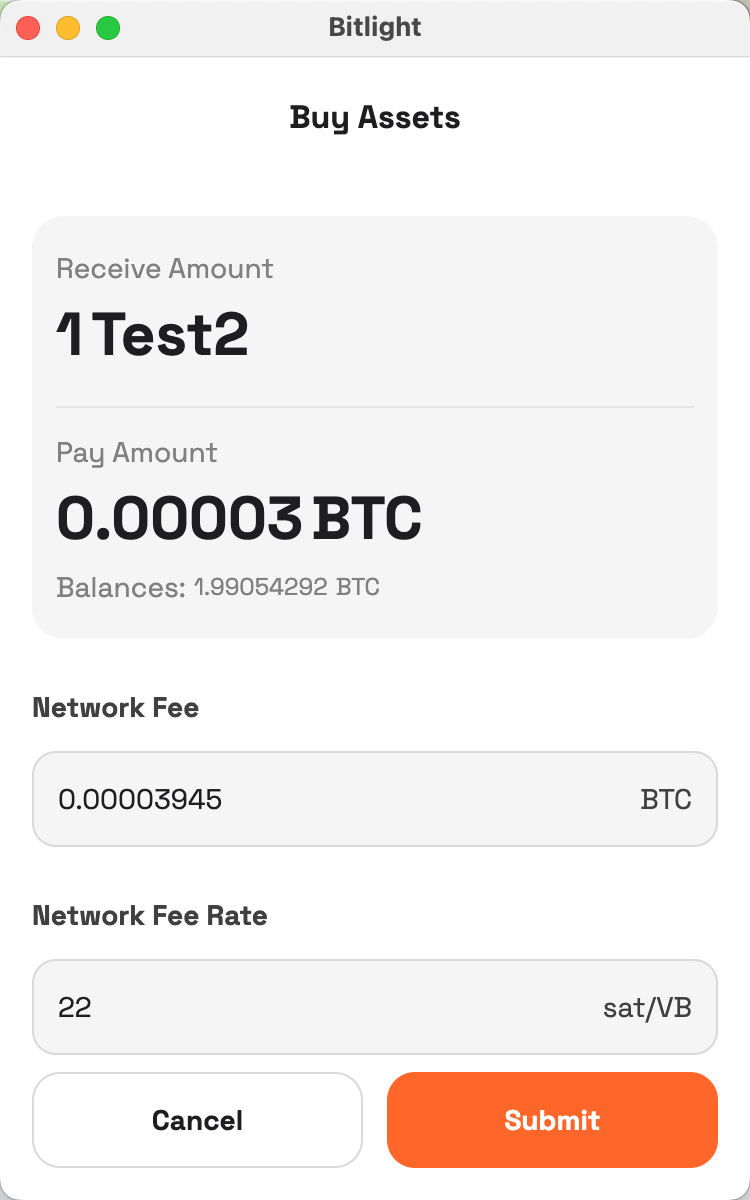
- The wallet UI should display: fee breakdown, expected BTC inputs, the UTXO intended for receiving RGB (allow explicit selection if required),
asset_id, asset name, and the order summary.
- The wallet UI should display: fee breakdown, expected BTC inputs, the UTXO intended for receiving RGB (allow explicit selection if required),
- The buyer must lock a UTXO for asset reception (record the
invoice_idand the output index). If a suitable UTXO already exists that can receive the same asset type, prefer reusing it; otherwise, the invoice/lock fails and the client should return an error. - As the buyer pays fees, he may set the transaction fee at this initial confirmation step.
- After confirmation, the client generates an unbroadcast PSBT (including buyer’s proposed inputs, tentative outputs and metadata) and submits that PSBT and invoice (with the locked receiving output) to the Market. The Market then creates the corresponding order record.
Note: The PSBT at this stage is a template — it will not include the seller’s inputs or any signatures. The PSBT must include a deadline/expiration field to avoid indefinite UTXO locks.
Step 2 — Market notifies Alice to prepare RGB consignment
The Market forwards Bob’s purchase request (including invoice_id, the unbroadcast PSBT template and order parameters) to Alice, requesting she prepare and attach the RGB consignment (transfer proof) to the PSBT.
Step 3 — Alice confirms sale and submits join-pay PSBT
Precondition: Seller’s wallet must verify the RGB balance suffices for the sale.
Key actions:
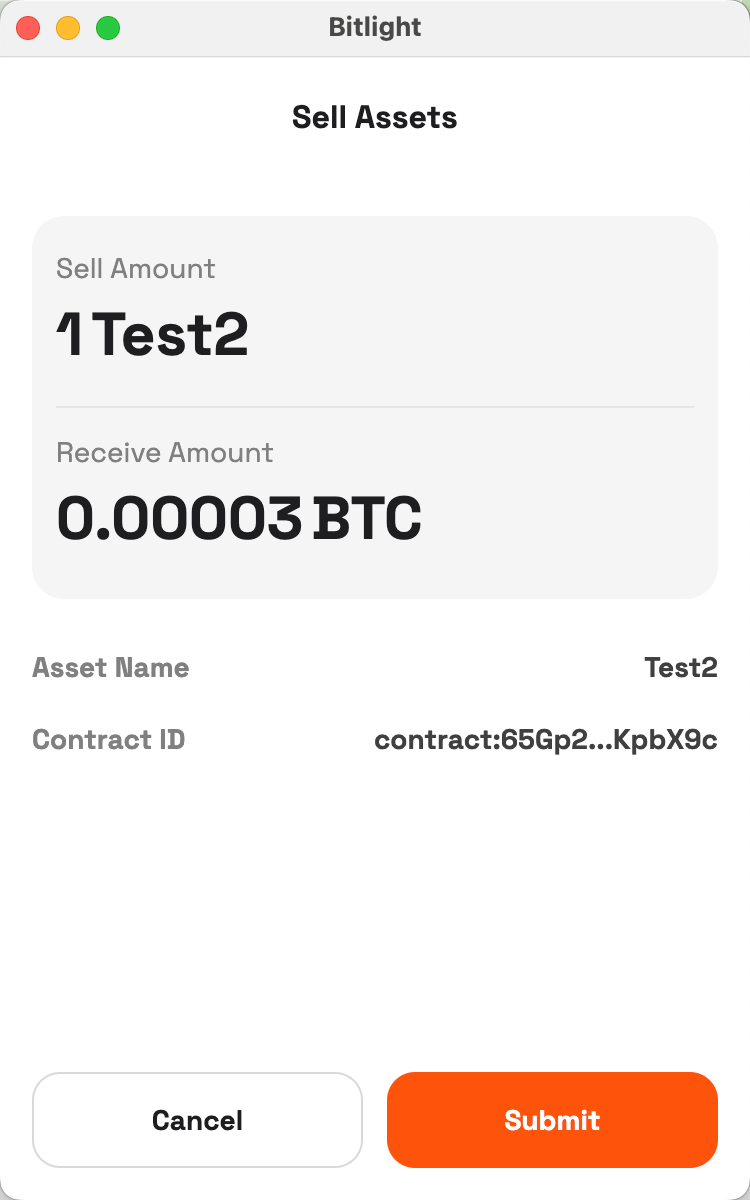
- Alice views the order in the Market UI (Market provides asset details). The UI should show: asset name,
asset_id, amount to send, seller proceeds in BTC, fees and fee rates. - Before confirming, the seller’s wallet should locally validate inventory and UTXO availability. If insufficient, reject and return an error.
- Alice constructs a PSBT fragment that includes her asset input(s) and the RGB consignment (a join-pay PSBT), then submits it with
payment_idto the Market. The Market attempts to merge buyer and seller PSBTs and performs basic checks (inputs/outputs, consignment matching, balances).
Step 4 — Market notifies Bob to review merged transaction
The Market sends the merged PSBT and transaction metadata back to Bob and prompts him to perform final parameter checks and local validations (balance, fees, receiving address and output consistency, etc.).
Step 5 — Bob confirms and submits his partial signature
Key actions:
- Bob reviews:
asset_id, receiving amount, BTC amount due, transaction fee. - Wallet rechecks Bob’s BTC balance to ensure sufficient funds for payment + fee; if insufficient, refuse signing and return an error.
- Bob creates partial signatures for his inputs (PSBT partial signatures) and submits the partially signed PSBT to the Market, flagged as
joinpay btc sign psbt. The Market should validate signature structure (format, covered input range, etc.) upon receipt.

Step 6 — Market notifies Alice for final signature
The Market forwards the PSBT that now includes Bob’s partial signatures to Alice and requests her final confirmation and signing (including any signatures required for the RGB consignment).
Step 7 — Alice finalizes signatures and broadcasts
Key actions:
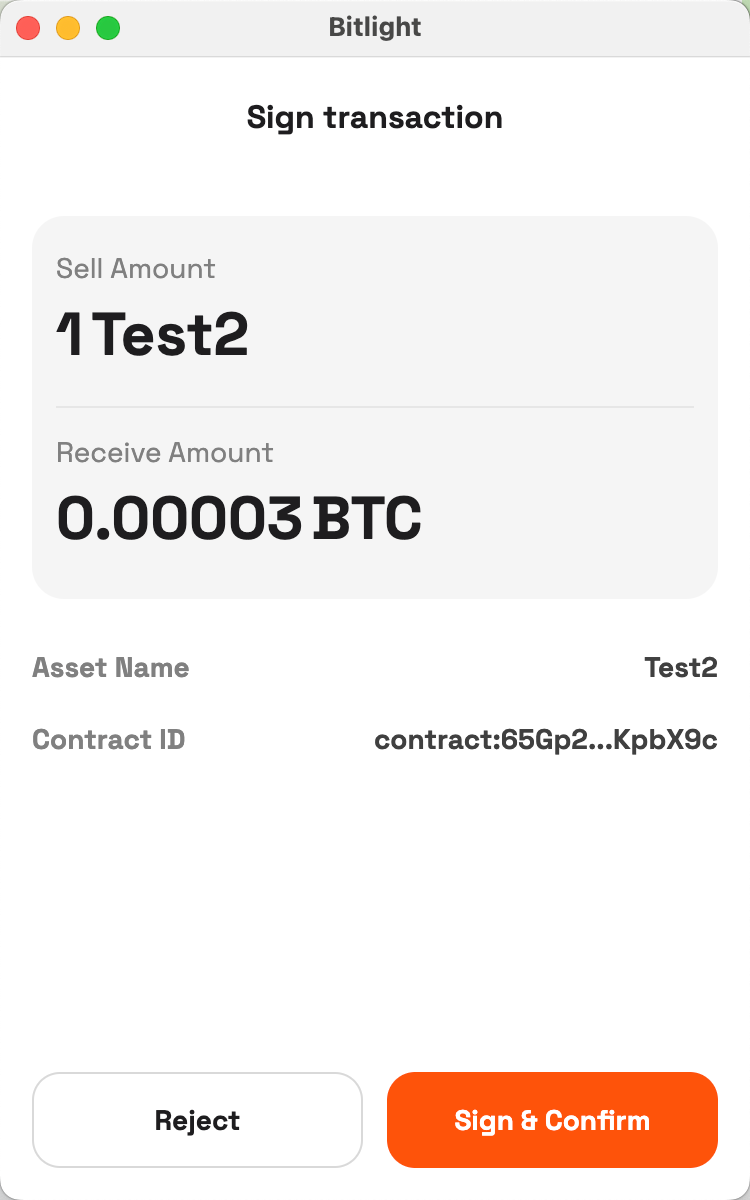
- Alice inspects the final PSBT locally and revalidates her asset and UTXO availability to avoid race conditions.
- Alice applies the required signatures to her inputs and the RGB consignment, finalizes the PSBT, and extracts a fully-signed raw transaction ready for broadcast.
Step 8 — Broadcast success & wallet updates
- After the transaction is accepted and confirmed on-chain, Alice should receive the BTC outputs assigned to her, and Bob should receive the RGB20 asset associated with the designated receiving UTXO.
- Wallets must update local balances and asset holdings (or rely on Market services to supply confirmed updates). The order record must capture the
txid, confirmation count and final state. - In case of partial confirmation failures, double-spend, or other anomalies, follow the error handling and dispute logging procedures.
Error Codes & Exception Handling (Core)
| code | name | description | action |
|---|---|---|---|
| 1001 | INSUFFICIENT_FUNDS_BOB | Buyer’s BTC balance is insufficient for payment + fee. | Reject signing; notify buyer and release or extend the locked UTXO based on timeout policy. |
| 1002 | INSUFFICIENT_ASSET_ALICE | Seller’s RGB inventory or corresponding UTXO is insufficient. | Reject trade, log reason, release buyer’s locked UTXO and notify both parties. |
| 1003 | PSBT_MERGE_FAILED | PSBT merge or validation failed (imbalance, input/output conflict, etc.). | Log for audit, notify parties to rebuild PSBT and include failure reason. |
| 1004 | SIGNATURE_MISMATCH | Signature validation failed (partial signature mismatch or invalid coverage). | Roll back the trade flow, alert operators and retain related PSBT/consignment/messages for postmortem analysis. |
| 1005 | INVOICE_EXPIRED | Invoice or PSBT expired (exceeded deadline). | Release resources and locks, notify parties and log the event. |
| 1006 | BROADCAST_FAILED | Transaction broadcast failed (node rejection, network error, etc.). | Retry broadcasting several times and alert; if node rejects, record the rejection and notify parties. |
Logging & Alerting Requirements
- Every failure must record:
order_id, current stage,error_code, timestamp, and PSBT/txid summary. - For critical failures (signature mismatches, broadcast exceptions, asset inconsistencies), trigger alerts and preserve full forensic evidence (PSBTs, consignments, message exchange logs) for dispute resolution and investigation.
Security & Compliance Considerations
- Never transmit private keys over the network: Exchange only PSBTs (partial signatures and public key / script metadata). Private keys must remain in the user’s local wallet.
- Principle of least privilege: Backend services should not retain any credentials capable of signing transactions.
- Replay protection: Every invoice/message should include a unique
invoice_id, nonce, and signature, and include an expiration timestamp to prevent replay. - Time windows / timeout management: All invoices/PSBTs should include a clear deadline; after expiration, they must be invalidated and any locked resources released.
- Auditability and traceability: Critical steps (PSBT generation/merge/signing/broadcast) should produce traceable logs and — where possible — timestamped signatures.
Example (Numeric Illustration)
Purpose: Demonstrate the successful completion of a PayJoin RGB20 trade when all preconditions are met.
Preconditions
- Bob holds a 5,000 sat UTXO and an available receiving UTXO.
- Alice holds a UTXO that carries 100 RGB20 units (UTXO value 5,000 sat).
- Both agreed on
price = 1,000 satandfee = 200 sat.
Test Steps
- Bob initiates purchase, locks receiving UTXO, creates PSBT and invoice.
- Market notifies Alice to prepare RGB consignment.
- Alice confirms sale and submits PayJoin PSBT.
- Market notifies Bob to confirm transaction.
- Bob reviews parameters and signs PSBT.
- Market notifies Alice for final confirmation.
- Alice completes RGB PSBT signing and broadcasts.
- Transaction is included in a block and both balances update.
Expected Outcome
- Transaction is broadcast and confirmed.
- Bob receives 100 RGB20 units and pays 1,200 sat total (price + fee).
- Alice receives 1,000 sat BTC and transfers 100 RGB20 units away.
- PSBT balance check example: total input 10,000 sat = total output 10,000 sat (Bob change 3,800 + Alice receives 6,000 + fee 200).
Safety Notes
Special considerations for third-party backends
Scenario
- Bob initiates a purchase, locks receiving UTXO, generates PSBT and invoice.
- Market notifies Alice to produce RGB consignment.
- Alice confirms sale and submits PayJoin PSBT (Alice’s asset now reserved in the in-progress transaction).
If Bob aborts or maliciously refuses to finalize after Alice confirmed and attached assets, Alice's asset may remain in an in-progress state and could be effectively lost or unavailable until the timeout expires. This presents asymmetric risk: Alice can incur a direct loss while Bob bears limited exposure.
Mitigation
The Market service should consider operating a custody agent (an internal managed wallet) that interacts with Alice and Bob to mitigate trust asymmetry. The Market must have mechanisms to balance or compensate Alice’s exposure when such failures occur.
For API details and integration guidance, refer to the accompanying interface/API documentation.